GitHub Copilot custom agents become much more useful when they represent a real engineering role, rather than just a long prompt.
To test that idea, I built a practical Azure Networking Assessment Agent.
The complete public repository is available here:
Azure Networking Agent on GitHub
The agent reviews Azure networking documentation and Terraform, compares the implementation against the intended architecture, identifies issues, and creates a version-controlled assessment report.
The user interaction can be as simple as:
Review this repository for Azure networking issues.
The rest of the workflow lives inside the agent and its reusable skills.
The Simple Mental Model
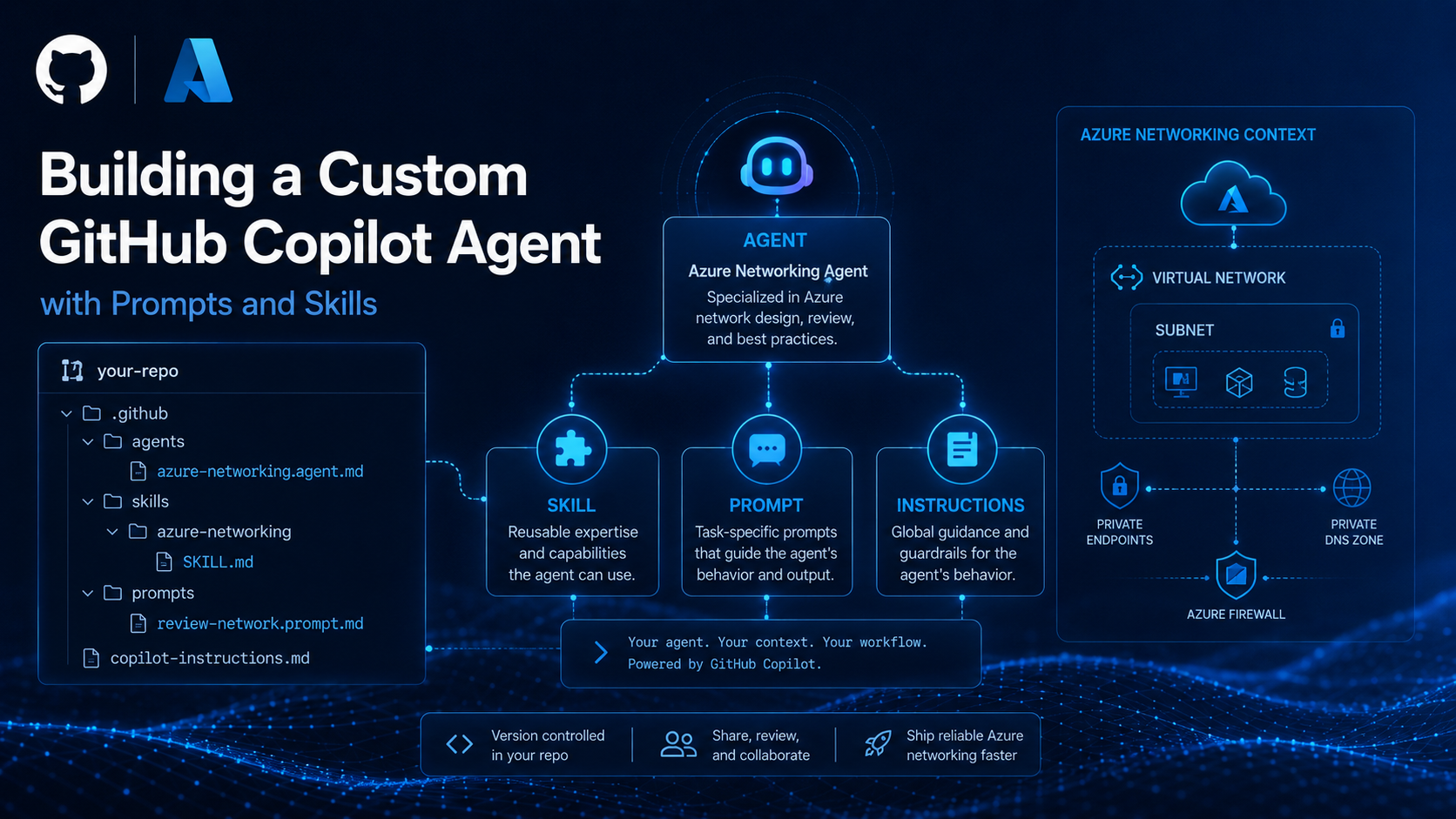
The final design follows five simple building blocks:
Agent        = Role and workflow
Skill        = Specialist knowledge
Prompt       = Task
Instructions = Repository standards
Artifact     = Persistent output
For this example:
Azure Networking Agent
        │
        ├── Azure Networking Skill
        │      Networking expertise
        │
        └── Assessment Reporting Skill
               Dashboard/report formatting
        │
        ▼
Repository documentation + Terraform
        │
        ▼
docs/assessments/network-recommendations.md
That separation is important.
The agent should not contain every networking rule, every reporting format, and every repository convention in one huge file.
Repository Structure
The core structure is intentionally small:
.github/
├── agents/
│   └── azure-networking.agent.md
│
├── skills/
│   ├── azure-networking/
│   │   └── SKILL.md
│   └── assessment-reporting/
│       └── SKILL.md
│
├── prompts/
│   └── review-network.prompt.md
│
└── copilot-instructions.md

docs/
├── current-architecture.md
├── network-requirements.md
└── assessments/
    └── network-recommendations.md

infra/
└── Terraform files
The two SKILL.md files are different skills:
- azure-networking — technical Azure networking knowledge
- assessment-reporting — how to create a clean technical assessment
This makes the knowledge reusable.
For example, a future Security Agent or Landing Zone Agent could reuse the same reporting skill without duplicating the entire report format.
What the Agent Actually Does
The agent follows a simple review workflow:
Read requirements
      ↓
Understand current architecture
      ↓
Inspect Terraform
      ↓
Compare intended vs actual state
      ↓
Identify evidence-based findings
      ↓
Generate assessment dashboard
The repository contains a deliberately imperfect Azure networking environment in Canada Central, including:
- hub-and-spoke networking
- VNet peering
- route tables
- NSGs
- Azure Storage
- Key Vault
- Private Endpoints
- Private DNS
- documented Azure Firewall and ExpressRoute dependencies
The point is not to tell the agent where the problems are.
The point is to see whether it can discover them itself.
What Happened During the Test?
The agent automatically:
- loaded the Azure Networking skill
- read the architecture and requirements
- inspected the Terraform
- searched for missing networking configuration
- compared the target state with the implementation
- generated a structured assessment
The final report was written to:
docs/assessments/network-recommendations.md
I committed that generated report to a separate branch so the output can be reviewed independently:
View the generated Azure Networking Assessment Dashboard
The assessment identified issues around areas such as:
- hub connectivity
- Azure Firewall routing
- VNet peering
- public PaaS access
- Key Vault private connectivity
- Private Endpoint DNS
- Internet-sourced NSG rules
More importantly, the report contained evidence, risk, and recommended remediation, rather than generic advice.
Why Create a Markdown Assessment?
Originally, the findings only appeared in Copilot Chat.
That works for a conversation, but it is not ideal for engineering delivery.
A better pattern is:
Agent review
    ↓
Markdown assessment
    ↓
Git branch
    ↓
Pull request / review
The generated assessment can now be:
- committed
- compared over time
- reviewed by another engineer
- discussed in a pull request
- retained as part of the project history
That turns the agent output into a proper engineering artifact rather than an ephemeral chat response.
Try It Yourself
Clone the repository:
git clone https://github.com/lavoizer-develop/azure-networking-agent-test-repo.git
cd azure-networking-agent-test-repo
Open the repository root in VS Code.
Select the azure-networking custom agent in GitHub Copilot Chat.
Then simply ask:
Review this repository for Azure networking issues.
The test is whether the agent can inspect the repository, use its specialist skills, and create:
docs/assessments/network-recommendations.md
without you having to explain the networking methodology every time.
The Bigger Idea
Azure Networking is only one role.
The same pattern can be extended to:
Azure Landing Zone Agent
Cloud Security Review Agent
Terraform Engineering Agent
Migration Assessment Agent
Application Modernization Agent
FinOps Agent
Reliability Agent
And multiple agents can share the same reusable skills.
That is where custom agents start becoming more interesting: not as isolated AI assistants, but as specialized engineering roles backed by reusable organizational knowledge.
Conclusion
The most useful lesson from this exercise was not how to create an .agent.md file.
It was how to separate responsibilities:
Agent
Defines the role

Skill
Provides specialist knowledge

Prompt
Defines the task

Instructions
Define repository rules

Artifact
Preserves the result
The Azure Networking Agent is a small but practical example of that model.
It can inspect Azure networking requirements and Terraform, identify meaningful gaps, and leave behind a version-controlled assessment that another engineer can review.
View the Azure Networking Agent repository
Written by Usman Mahmood
Founder of The Cloud Captain, sharing practical guidance on cloud architecture, platform engineering, automation and modern infrastructure.